Showing posts with label framework. Show all posts

Wednesday, 29 June 2016

Calling C# Methods from SQL Server

I was recently able to take advantage of a useful Microsoft SQL Server feature that enabled me to call a .NET library class method from a stored procedure.

Brief Context


I was working on a client project in which our team were required to write an ETL process. The ETL process was mostly written using SQL Server Integration Services (SSIS). In one part of the ETL process, we needed to do some fuzzy string similarity matching. We found that the Levenshtein string distance algorithm suited our requirements.

Aside: The Levenshtein algorithm takes two strings and computes the "edit distance" which indicates how many transformations are necessary to reach a given target string from a given source string. For example, the function Levenshtein("test", "tear") would return the value two.

In our case, we wanted to abstract the Levenshtein output into a percentage, so for example, the function GetTextSimilarity("test", "tear") would return 50% - indicating that the inputs are half similar.

Creating the Class Library


The full code for the class library is available on GitHub.

The first step is to create a .NET class library which targets a .NET framework version that the flavour of SQL Server you are working with supports. In my case, we created a C# class library targeting .NET framework 4.5 as we were going to use the class library in Microsoft SQL Server 2014.

Ensure that the method you want to call from SQL Server is marked static. You will need to decorate the method with the Microsoft.SqlServer.Server.SqlProcedure attribute. If you look at my class library code, you'll find two classes, namely, LevenshteinDistance and StringCompare. The LevenshteinDistance class contains the algorithm implementation in a static method marked with the SqlProcedure attribute. Similarly, the StringCompare method (shown below) contains one method, GetTextSimilarity, which is the method we want to call as a function from SQL server.

The GetTextSimilarity method calls the LevenshteinDistance.GetLevenshteinDistance method and returns the percentage similarity value that we required. Note that only the method you want to call as a function requires the SqlProcedure attribute. In this case, we could have only marked the GetTextSimilarity method with this attribute as this is the only method we want to call from SQL Server.

Registering the Class Library in SQL Server


Once you've finished writing the class library and you are ready to call your method(s) from SQL Server, you'll need to execute the following SQL script (obviously, you'll need to replace the database name, assembly file path, function name and method namespace).


Once the script has finished executing, you will find the registered assembly under the Database\Programmability\Assemblies node in SQL Server Management Studio.

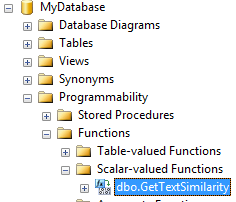
If you look under Database\Programmability\Functions, you'll find the method you registered earlier (see SQL script).


You can now call your method as a standard T-SQL function call. Quite useful!

Tuesday, 25 August 2015

Conway's Game of Life: An Exercise in WPF, MVVM and C#

This blog post was written for the Lockheed Martin Insight blog, sharing here for the external audience.

Last month I started the Pluralsight summer camp by watching an interesting video in which the presenter implements Conway's Game of Life using HTML, CSS and JavaScript. The video inspired me to write an MVVM based implementation of the game using Windows Presentation Foundation (WPF) and C#. There were two aims to this exercise. The primary was for me to reacquaint myself with WPF, which is a framework I've been wanting to spend some time with for a while. And the secondary was to implement something fun.

The purpose of this blog post is to document the exercise. We'll cover what Conway's Game of Life is, a bit about the design and then see how some WPF and .NET framework features help in implementing an MVVM solution. The source code for the implementation is available on GitHub.

So, what is Conway’s Game of Life?

The Game of Life is a popular cell automaton algorithm that simulates the evolution of life. The algorithm was designed by British mathematician John Conway and has gained popularity for its simplicity. In its purest form, the universe for the Game of Life is represented by a grid which has an infinite number of cells. Each grid cell can contain a dead or living cell. The game starts with the user providing a seed generation of living cells. Based on the initial generation of cells, the universe evolves through generations to simulate evolution. For a generation to evolve, the following four rules are applied to the current generation:

  1. Any live cell with fewer than two live neighbours dies (due to under-population).
  2. Any live cell with two or three live neighbours lives on to the next generation.
  3. Any live cell with more than three live neighbours dies, (due to overcrowding).
  4. Any dead cell with exactly three live neighbours becomes a live cell (by reproduction).

And that's it. By applying these four rules, it is surprising to see how a universe can evolve to create complex symmetrical patterns, even when there is no symmetry or pattern in the seed generation.

Arriving at an Object-Oriented Design

The MVVM architectural design pattern was adopted to achieve a clear separation of concerns. I started by identifying the models:

  • Cell Model: Represents a single cell in the universe. Encapsulates data for the cell's position and whether it is dead or alive.
  • Generation Model: Represents a generation of life. Encapsulates data on the size of the universe, the cells within the universe and provides functionality to alter the living state of cells.

The EvolutionEngine class was identified to hold the current generation and take on the responsibilities of:

  • Evolving the current generation to the next generation, as per the rules of evolution.
  • Detecting if the current generation can no longer evolve.
  • Keeping track of the number of generations that the current generation has evolved through.
  • Resetting the generation back to an empty state.

A single view-model was identified, namely, GenerationViewModel. The view-model uses the EvolutionEngine class to:

  • React to actions that originate from the view.
  • Provide information for the view to display.
  • Provide notifications to the view if the observed information changes.

In summary, we have a couple of models, an engine class to work with the models and a view-model to keep the view in sync with the models.

Writing the MVVM WPF Implementation

The following diagram illustrates how the components of an MVVM solution are related in WPF (image source).

A view is built using the eXtensible Application Markup Language (XAML). The association between a view and its view-model is accomplished through the DataContext property of the view. Controls in a view are bound to properties in the view-model using the data binding features of WPF. In a scenario where the view-model is only serving as a proxy between the view and model, you may consider the use of a view-model superfluous and let the view-model expose the underlying model (see the "Why Use a ViewModel?" section in an MSDN article). Actions performed on the user interface are encapsulated in commands that are exposed by the view-model (using the Command design pattern). We will see how a view-model exposes its supported commands using the ICommand interface. Finally, notifications are raised as C# events from the view-model. The INotifyPropertyChanged interface is used primarily for this purpose.

As I’ve alluded to, there are a number of useful features in WPF and .NET that assist in the implementation of an MVVM solution. The particular features that I’m referring to are:

  • The FrameworkElement.DataContext property.
  • Using the Binding class to associate parts of the view to the view-model.
  • Raising notifications through the INotifyPropertyChanged interface.
  • Converting incompatible data between bound properties using the IValueConverter interface.
  • Encapsulating and executing actions using the ICommand interface.

Each of these features were used in the implementation for the game. In the sections below, we will discuss what each of these features are and see examples of how they were adopted in the solution.

Setting the Data Context and specifying a Binding

The Grid control was a natural choice to visually represent the universe. Each cell of life within the universe is represented by a TextBlock control. The code snippet below shows how the TextBlock is created:

In WPF, user interface controls derive from the FrameworkElement class which contains an important property named DataContext. The DataContext property of a control is set to an object that the control uses to pull its data from and/or push its data to. This object is typically a view-model or model instance. By setting the TextBlock.DataContext property to an instance of the Cell model we can bind properties of the TextBlock control to properties of the Cell model.

Aside: As a WPF view is hierarchical, a nice feature of using the DataContext property is that it can be inherited from a parent user interface control.

In our Game of Life implementation, we use the Background (colour) property of the TextBlock control to indicate whether the cell is dead or alive. On lines 7-10 of the CreateCellTextBlock method, you’ll see that we call the SetBinding method. The first parameter to this method specifies which property we want to set the binding for (made possible with Dependency Properties) and the second parameter accepts a Binding instance.

The Binding instance is created by the following method:

There are a few things to note here. Firstly, the Binding object supports a Source property which we do not explicitly set. The reason for this is that if no Source property is set on a binding, the binding defaults to using the DataContext property on the control that the binding is set on. In this case, the TextBlock control’s DataContext property is already set to a Cell model instance. We can therefore set the Path property to point to a particular property within the model, in this case the boolean Cell.Alive property.

The Mode property is set to the enumeration value of BindingMode.TwoWay, meaning that any change to the TextBlock control through the user interface updates the model and conversely any change to the model updates the user interface. To support two-way binding, the Cell model will need to implement the INotifyPropertyChanged interface so that any change to the Alive property is notified to the view.

Implementing Notifications with INotifyPropertyChanged

The INotifyPropertyChanged interface is implemented by classes that need to notify clients (in our case, the view) that an observed property value has changed. Typically, this interface is implemented by view-models or models that want to broadcast changes to certain property values.

INotifyPropertyChanged supports one member, the PropertyChanged event. If you have a two-way binding setup between a user interface control property and a view-model property, programmatic changes to the view-model property will not be reflected in the user interface unless the view-model implements INotifyPropertyChanged and the observed property’s setter raises the PropertyChanged event.

In our solution, we wrote a reusable ObservableBase class that implements INotifyPropertyChanged. The Cell and GenerationViewModel classes both inherit from ObservableBase.

The PropertyChanged event is raised from the OnPropertyChanged method which accepts a single parameter – the name of the property that has changed. The CallerMemberName attribute is used so that we can call this method without having to specify a hardcoded string with the property name. The code below shows the implementation for the Cell model, which inherits from ObservableBase.

Notice how the Alive property setter calls the OnPropertyChanged event. An unfortunate side effect of implementing INotifyPropertyChanged is that you’re unable to use automatic properties for the properties that need to raise the notification event.

Converting Between Bound Properties Using IValueConverter

In our earlier code snippet for the CreateCellAliveBinding method, you may have noticed that we also set the Binding.Converter property. The Converter property is used when we bind two properties that have a type mismatch or expect data in different formats. To recap, we are using the Background (colour) property of the TextBlock to indicate if the cell represented by the TextBlock is dead or alive. The Alive property on our Cell model is of boolean type, therefore, we need our binding to convert the boolean value to a colour. This is where the IValueConverter interface is used to take on the role of an adapter.

The implementation of the IValueConverter is in the class LifeToColourConverter, shown below:

The IValueConverter interface supports two methods, namely, Convert and ConvertBack. The Convert method is used when binding the value from the source property (Cell.Alive) to the target property (TextBlock.Background). Conversely, the ConvertBack method is used when updating the source from the target. If you are only using one-way binding, then you are only required to provide an implementation for the Convert method (the ConvertBack method can safely throw the NotImplementedException).

Handling User Interface Actions Using the Command Design Pattern

A view-model exposes a set of actions that are encapsulated within commands. Commands are exposed as properties on the view-model so that user interface controls can bind to them. The logic for a command is encapsulated within a class that implements ICommand. The ICommand interface supports two methods; CanExecute and Execute. The CanExecute method returns a boolean value which determines whether the command can execute. The Execute method contains the command logic to run.

In our solution, the view's DataContext is set to an instance of the GenerationViewModel class. In this view-model, we expose the following three commands:

RelayCommand is a popular implementation of the ICommand interface which has been available as open source for some while. We are using a particular variant of RelayCommand which enables a single parameter to be sent to the method that ultimately executes the command. You can view how the three command properties are initialised and the implementations for the CanExecute/Execute methods in the GenerationViewModel class.

An advantage of the RelayCommand implementation for ICommand is that it achieves reusability by using the Predicate and Action delegates to reference the CanExecute and Execute methods respectively. This avoids the need for writing a separate ICommand implementation for every command that the game supports.

In the user interface for the game, we have two buttons. One button binds to the view-model EvolveCommand property and the other binds to the ResetCommand property. The XAML snippet below shows how the command bindings are created:

If the ICommand.CanExecute method returns false for a command that is bound to a button, the button is automatically disabled.

The ToggleCellLifeCommand is executed when the user is setting up the initial generation of living cells, the binding for this command is setup programmatically by the following method (called by the CreateCellTextBlock method shown earlier):

We are using the InputBinding class to specify that a left mouse click on the TextBlock should execute the ToggleCellLifeCommand and pass it a formatted string that contains the cell position. The ToggleCellLifeCommand method implementation in the GenerationViewModel class looks up the cell and toggles the Alive property boolean value. As we have an active binding between each TextBlock and its Cell.Alive property, the TextBlock colour will automatically change to a colour that represents the current value for the Alive property.

Summary

In this post, we’ve introduced and described some of the main features that WPF and the .NET framework provide for implementing MVVM based solutions. Conway’s Game of Life served as a fun exercise to use these features with.

We saw how the FrameworkElement.DataContext property enables seamless binding between user interface controls and properties on view-models. Two-way binding was shown to be possible using the INotifyPropertyChanged interface as a mechanism to notify the view of changes in the view-model. We introduced a useful ObservableBase class which implements INotifyPropertyChanged and can be reused in future WPF projects that need to support two-way binding. To bind two properties that work with different data types, we saw how an implementation of the IValueConverter interface can be used as an adapter. Finally, we saw how the command pattern is used to encapsulate logic in an ICommand implementation and how commands are exposed as properties on a view-model that can be bound-to in the view.

The animated graphic below shows the finished game. In the animation, we see the evolution for a simple L-shaped seed pattern in a universe of 25x25 cells. Surprisingly, this basic seed pattern lives through eighteen generations of life with some fascinating symmetrical patterns before it stops evolving.

Full source code is available in a GitHub repository.

Saturday, 2 May 2015

Microsoft Exam 70-483: Programming in C#

Earlier this week I took and passed the Microsoft 70-483 exam. In this post, I'll provide some insight into my preparation.

The 70-483 exam tests your knowledge on the C# programming language and the .NET framework. In this case, it was C# 5 and the .NET Framework version 4.5. By passing this exam, you earn the Microsoft Specialist certification.
 
The official Microsoft page for the exam can be viewed by clicking on this link. I took the exam in the UK. It should be noted that the 70-483 exam is also the first exam on the path for the MCSD Windows Store Apps certification, which is ultimately the certification that I'm aiming for. 
 
As described on the official 70-483 exam page, the exam is broken down into four main areas:
  • Managing program flow
  • Creating and using types
  • Debugging applications and implementing security
  • Implementing data access

Under each of these topics on the exam page, you get a detailed breakdown of what is covered. There is a plethora of resources on the web that you can use to prepare for this exam (blogs, MSDN, PluralSight etc.). I recommend watching the exam prep video on the exam page first - this sets the scene in more detail and gives you a better idea about the topics covered on the exam.
 
As the two guys mention on the Microsoft prep video, there is no substitute for actual practice. At the beginning of my preparation, I created a blank console application in Visual Studio and added to this as I revised various topics. I wrote a method for each particular language construct or .NET framework class that I wanted to further understand. In each method, I practiced using a particular construct/class by referring to the MSDN site for the topic. I found this approach useful in clarifying how something works - the code produced also served as a useful reminding aid when the exam date got closer (the brain recalled those "eureka" moments that I had when writing the code). LINQPad is also a useful tool for practicing.
 
I found the official Microsoft exam reference book by Wouter de Kort useful (Amazon link here). Although the book shouldn't be used as a definitive resource, it serves as a useful aid in introducing various topics which you then should build upon with your own further research. I particularly found the multithreading, cryptography and managing assemblies sections of the book a worthwhile read.
 
I also bought the practice tests from MeasureUp. The practice tests were useful to get a feel for question formats - which are a mixture of multiple choice (sometimes with more than one correct choice) and drag and drop type questions. You can also loosely simulate test conditions by running the MeasureUp tests in "certification mode" - meaning that you are timed and unable to see the answers as you progress in the test. Note that the actual exam format/time can differ compared to the MeasureUp practice certification mode tests.
 
Finally, ensure you read the website of the test centre. In the UK, Microsoft has appointed the PearsonVUE test centres. I found the videos on the PearsonVUE website useful in telling me what to expect on the day (security procedures, the software used for the exam itself and what I need to bring with me on the exam day).
 
If you're taking this exam, all the best and feel free to leave a comment about your experiences!

Friday, 16 January 2015

C# How To: CSV to List or List to CSV

The following code snippet shows how to convert from a CSV string to a List using the string class Split method.

const string ColoursCsv = "red,blue,green,yellow";
                        
List<string> coloursList = ColoursCsv.Split(',').ToList();

The following code snippet shows how to convert from a list to a CSV string using the string class Join method.

List<string> coloursList = new List<string> { 
    "red", 
    "blue", 
    "green", 
    "yellow" 
};

string coloursCsv = string.Join(",", coloursList);

C# How To: Convert to Convert String to Int

To convert from a string to an integer type you can use the Convert class as shown in the code snippet below. The Convert class contains a large number of static methods which allow you to convert from one type to another.

string numberString = "1985";
int number = Convert.ToInt32(numberString);

Monday, 12 January 2015

C# How To: Start a Program/Process

To start a program in C#, you can use the Process class. The Process class has a static method called Start which accepts a filename as a parameter. The example below shows how easy it is to start Microsoft Notepad from a C# application. Remember to include the "using System.Diagnostics;" directive at the top.

const string ProgramPath = "Notepad";

Process.Start(ProgramPath);

Note that if you need to start a program which accepts command line arguments, then you can use an overload of the Start method which accepts a ProcessStartInfo object. The following snippet shows how to open a file within notepad from your C# application.

const string ProgramPath = "Notepad";

Process.Start(new ProcessStartInfo
    {
        FileName = ProgramPath,
        Arguments = @"C:\WriteTest.txt"
    }
);

Sunday, 11 January 2015

C# How To: Create Text File And Write To It

Continuing with my new C# "how-to" theme, the code snippet below shows how to create a text file and write content to it using the StreamWriter class. Remember to add the "using System.IO;" directive at the top. Note that there is a StreamWriter constructor which supports a Boolean parameter "append" - if you pass true for this parameter and the file already exists, the StreamWriter will append content to the file rather than overwrite the existing content.

const string TextFilePath = @"C:\WriteTest.txt";

using (StreamWriter writer = new StreamWriter(TextFilePath))
{
    writer.WriteLine("Hello, world");
    writer.WriteLine("Bye, world");
}

C# How To: Read a Text File

This is the first of a series of C# "how to" posts. The following C# code snippet shows how to read a text file line-by-line using the StreamReader class. Remember to add the "using System.IO;" directive as this is the namespace which the StreamReader class is in.

const string TextFilePath = @"C:\ReadTest.txt";

using (StreamReader reader = new StreamReader(TextFilePath))
{
    string currentLine;

    while ((currentLine = reader.ReadLine()) != null)
    {
        Console.WriteLine(currentLine);
    }
}

Sunday, 10 August 2014

C# Static Code Analysis with NDepend

I was fortunate enough to recently obtain a Pro license for NDepend. If you've never heard of NDepend, it is a powerful .NET code analysis tool which provides useful information to support you in writing better code. As I work on a large codebase, my initial worry was that NDepend may slow down my user experience with Visual Studio. However, after using it for one month, I have not come across a single moment in which NDepend slowed my IDE experience.

I'll quickly admit that I have no extensive experience of using code analysis tools, therefore I can't comment on how NDepend compares to other tools in the market - but I can comment on the features that I've found very useful. A quick glance on the documentation section of the NDepend website shows the powerful feature set that the tool supports. Below I briefly go through some of the features that I've found useful to date. I still feel that I've barely scratched the surface of some of the features that NDepend supports (particularly CQLinq), so the hope is to come back and update this post as and when I find something else I like.

Visual Studio Support and Integration - NDepend supports all the major versions of Visual Studio (2008, 2010, 2012 and 2013). I installed NDepend (the Pro license) on Visual Studio 2010 Professional Edition and have had no issues since installation. I have also installed a trial version of NDepend on the more later Visual Studio 2013 and found that it works just as good. The installation process was quick and straight forward. I particularly like the non intrusive nature of the tool - after installation, you get an "NDepend" menu option in Visual Studio. From this menu you can run an analysis on your projects. There is also a small circle icon which appears in the bottom right corner of Visual Studio - if you hover your mouse over it you'll get quick access to certain options (like running an analysis or viewing the dashboard) and also information on the number of NDepend code rules violated (more on Code Queries and Rules below).

NDepend Dashboard - Once an NDepend analysis completes, you get the option to view the NDepend Dashboard. The dashboard itself opens within Visual Studio as a new tab and provides a comprehensive array of information. Some of the information you get is:

- Lines of code (split by the number of lines you've written and the number of lines not written by you)
- Method complexity information
- Quantity information on assemblies, namespaces, methods, fields, source files and lines of comments
- Code coverage by tests
- Third party usage
- Information on violated code rules

Note that NDepend also is able to create a report in HTML which provides all this information and more. I imagine that saving "snapshots" of these reports over time would really help in assessing how your codebase is growing in terms of quality over time.

Code Rules and Queries - Perhaps one of the main features which makes NDepend so powerful is CQLinq. CQLinq stands for Code Query LINQ which allows you to query your codebase using LINQ-based queries. NDepend comes with a large number of predefined queries which give you useful information out of the box. Using the "Queries and Rules Explorer" panel you can see the CQLinq code for each query and also define your own query. You can think of CQLinq as a way to very easily reflect on your codebase using simple LINQ-based syntax that you'll already be familiar with. CQLinq provides a very useful mechanism for you to extend NDepend based on the information you want to extract from your code base. It also opens the opportunity for you to share your CQLinq queries with other NDepend users. You can find out more about CQLinq here.

Additional Visual Studio Features - In addition to its core features, NDepend provides a number of extra useful features like code diffing, dependency analysis, visualisation of code metrics and richer code search features. From what I understand, NDepend search is essentially a user interface over CQLinq.

As mentioned above, I'm a fairly new NDepend user. I find it an intuitive tool to use and quickly found myself benefitting from the information the tool provides. I'm particularly now interested in trying out NDepend on a greenfield project and seeing how it affects and shapes the day-to-day development of a new codebase. The features mentioned above are a very small subset of NDepends full feature set. If you're interested in trying out and knowing more about the tool - you can download it from here and read about all the supported features here. I also encourage you to go through the very useful documentation part of the site.

Tuesday, 25 February 2014

Debugging and Viewing .NET Code

Quick post, a colleague of mine recently circulated a very useful Microsoft link (below) which allows you to browse through the .NET framework source code through the browser. Very useful for learning how things work under the hood.

.NET Framework Reference Source

You can also setup your instance of Visual Studio to debug into the framework - see this blog post.

There is also a useful related Visual Studio extension here.

Friday, 11 October 2013

The ExpandoObject Stringified

I had a requirement to output some data as part of a number of pages in an e-commerce site. This data would change from page to page and typically get richer as a user would go through an order path in the application. The data needed to be in JSON format and was going to be used by the marketing guys to help track information about user behaviour across the order process. The data was also subject to change regularly depending on what the marketing team wanted to track. In short, I had to construct a JSON string on the server side in C#.

I had seen something like this done before where a StringBuilder was used to construct a large JSON string which was then pushed out in the response with the rest of the page markup. This approach seemed messy and difficult to maintain. I did a bit of research on some approaches to constructing a potentially complex and changing JSON object using C# and came across the ExpandoObject class. MSDN has a nice succinct explanation of ExpandoObject:
"Represents an object whose members can be dynamically added and removed at run time."
You can find this class in .NET 4 in the System.Dynamic namespace. ExpandoObject lets you effectively "model" an object on the fly with properties that don't really exist (just like using the ViewBag in ASP.NET MVC). In my case, it saved me from writing a number of classes or complex strings just to hold data that was to be output in page responses. Instead, I could use ExpandoObject and then use a JSON serializer to stringify the object.

The example below shows how easy and flexible it is to use ExpandoObject with the Newtonsoft .NET JSON library (available as a NuGet package):
dynamic orderInfo = new ExpandoObject();

orderInfo.OrderDate = DateTime.Today;

orderInfo.ProductTypesAdded = new List<dynamic>();
orderInfo.ProductTypesAdded.Add("Radio");
orderInfo.ProductTypesAdded.Add("Television");
orderInfo.ProductTypesAdded.Add("Recorder");

orderInfo.ReachedCheckout = true;
orderInfo.PaymentMethod = "Card";
            
orderInfo.DeliveryInfo = new ExpandoObject();
orderInfo.DeliveryInfo.Method = "First";
orderInfo.DeliveryInfo.Country = "UK";

var json = JsonConvert.SerializeObject(orderInfo);
The resulting JSON is:
{
    "OrderDate":"2013-10-11T00:00:00+01:00",
    "ProductTypesAdded":[
        "Radio",
        "Television",
        "Recorder"
    ],
    "ReachedCheckout":true,
    "PaymentMethod":"Card",
    "DeliveryInfo":{
        "Method":"First",
        "Country":"UK"
    }
}

Sunday, 7 July 2013

C# How To: Implement the Soundex Algorithm

I caught the end of a conversation about the Soundex algorithm at work the other day which inspired me to write an implementation of it in C#. If you are not familiar with what Soundex is then the Wikipedia article on Soundex is a good place to start. I first came across this algorithm in a Natural Language Processing module during my university education. In a nutshell, when the Soundex algorithm is applied to a word, a Soundex Code is produced as output. Words that differ in spelling but sound the same (homophones) should produce the same Soundex Codes. For instance, "to" and "two" are spelt differently, but sound the same and therefore produce the same Soundex Code of "T000".

This is a useful little algorithm and I particularly like it for its simplicity and the fact that the heuristics used in the algorithm work well in most cases (one limitation of Soundex is that it falls short of covering words that sound the same but have a different first letter, e.g. "site" and "cite" produce different Soundex codes). Soundex is useful when writing search functionality where you want to account for misspellings in the users query. It's worth pointing out that SQL Server natively supports Soundex (see the Soundex function in T-SQL, for example).

My C# implementation is below - I opted to implement it in a static class that exposes one public method "For". The example source code is available on GitHub - https://github.com/rsingh85/SoundexExample

public static class Soundex
{
    public static string For(string word)
    {
        const int MaxSoundexCodeLength = 4;

        var soundexCode = new StringBuilder();
        var previousWasHOrW = false;

        word = Regex.Replace(
            word == null ? string.Empty : word.ToUpper(),
                @"[^\w\s]",
                    string.Empty);

        if (string.IsNullOrEmpty(word))
            return string.Empty.PadRight(MaxSoundexCodeLength, '0');

        soundexCode.Append(word.First());

        for (var i = 1; i < word.Length; i++)
        {
            var numberCharForCurrentLetter =
                GetCharNumberForLetter(word[i]);

            if (i == 1 &&
                    numberCharForCurrentLetter ==
                        GetCharNumberForLetter(soundexCode[0]))
                continue;

            if (soundexCode.Length > 2 && previousWasHOrW &&
                    numberCharForCurrentLetter ==
                        soundexCode[soundexCode.Length - 2])
                continue;

            if (soundexCode.Length > 0 &&
                    numberCharForCurrentLetter ==
                        soundexCode[soundexCode.Length - 1])
                continue;

            soundexCode.Append(numberCharForCurrentLetter);

            previousWasHOrW = "HW".Contains(word[i]);
        }

        return soundexCode
                .Replace("0", string.Empty)
                    .ToString()
                        .PadRight(MaxSoundexCodeLength, '0')
                            .Substring(0, MaxSoundexCodeLength);
    }

    private static char GetCharNumberForLetter(char letter)
    {
        if ("BFPV".Contains(letter)) return '1';
        if ("CGJKQSXZ".Contains(letter)) return '2';
        if ("DT".Contains(letter)) return '3';
        if ('L' == letter) return '4';
        if ("MN".Contains(letter)) return '5';
        if ('R' == letter) return '6';

        return '0';
    }
}
Example:

// Both lines below output R100
Console.WriteLine(Soundex.For("Ravi"));
Console.WriteLine(Soundex.For("Ravee"));

Wednesday, 20 February 2013

Implementing the Chain of Responsibility Design Pattern

Earlier this week I made use of the Chain of Responsibility design pattern to solve a fairly straight-forward problem. I've always been careful when trying to apply design patterns, it's easy to get carried away and try to force a design pattern to a problem that doesn't really require it. In this case, I felt it was justified and hopefully you'll think the same!

The Context

I'll give some context to the problem before we go into exactly what the Chain of Responsibility pattern is. I was working on a HTTP service (built on ASP.NET Web API) which had an API controller action that accepted requests for some data stored in a persistent repository. My requirement was to inspect the incoming request object, and depending on certain characteristics of the request, log the request object data to zero or many different output locations. This is to enable reporting on the types of requests that the service receives. The output locations were disparate data stores such as an XML file, Excel file and SQL Server Database. The key point was that to log the request I had to inspect the content of the request, and depending on some criteria, log it to none or certain data stores. Furthermore, certain requests had to be ignored and therefore not logged.

Chain of Responsibility

When I read this requirement I knew immediately there was a design pattern for this type of problem. I had taken an Object-Oriented design pattern course at university around six years ago but couldn't quite remember the name of the pattern. After having a quick look on the GoF website, I eventually found it - Chain of Responsibility (CoR). CoR is a software design pattern that has been classified into the "behavioral" category of patterns - these are patterns that broadly deal with objects interacting with other objects. The idea is that you have multiple handler objects chained together just like a linked list data structure. An incoming request object is passed over to the first handler in the chain, the handler (depending on its "responsibility"), inspects the request and can either:
  1. Handle the request and not pass the request down the chain of handlers
  2. Handle the request but still pass the request down the chain of handlers
  3. Not handle the request and pass the request down the chain to the next handler
Note that before a handler sends the request object down the chain, it is also responsible for checking if it is actually linked to another handler. If a handler isn't linked to another handler, it is the last handler in the chain and therefore consumes the request.

Applying CoR to the Problem

In my case, the incoming data request to the API was my CoR request that required "handling" from a logging perspective. I implemented a separate concrete logging handler class for each of the concrete data stores (XML, Excel and SQL Server). Each logging handler inspected the request and logged the request if it matched the criteria for the handler before passing the request to the next handler. Therefore, in my case, the CoR handler behaviour corresponded to point two above.

The Implementation

Note that I've stripped down the code below (especially for each concrete handler) so that it is easier to see what's going on from a design pattern perspective.

The first step was to write an abstract base handler that defined the behaviour that each of my handlers will support. The HandlerBase class below is generic enough to be reused in any case where you require a CoR implemented. The single type parameter "TRequest" is the type of the object that will go through your chain (can be any .NET type).
public abstract class HandlerBase<TRequest>
{
    public HandlerBase<TRequest> Successor
    { 
        protected get; 
        set; 
    }

    public abstract void HandleRequest(TRequest request);
}
The HandlerBase class has one property, which allows users of a handler to set a successor to this handler (the next handler in the chain) and it has an abstract method that all derived classes will need to implement - HandleRequest. You will see further below how we use the Successor property when setting up our chain, and how each concrete handler (a class that derives from HandlerBase) uses the HandleRequest method on its successor to pass the request down the chain.

Next, I implemented each of my concrete handlers - that is, a handler for logging to an XML document, Excel document and SQL server.
public class LogRequestToXmlHandler : HandlerBase<ApiDataRequest>
{
    public override void HandleRequest(ApiDataRequest request)
    {
        if (request.Foo == Something && request.Bar == SomethingElse)
            // Log request to xml document

        // Pass on the request to the next handler, if any
        if (base.Successor != null)
            base.Successor.HandleRequest(request);
    }
}
Notice how the concrete handler LogRequestToXmlHandler derives from HandlerBase and passes the type of the object that is going through the chain - ApiDataRequest. Also notice that because we're inheriting from an abstract base class containing one abstract method - we're forced by the compiler to override the HandleRequest method. This method accepts one parameter, the request object. It is in this method that you will place any specific handling logic for the request object - I've added some pseudo-code to demonstrate this. The last couple of lines inspect the Successor property (inherited from the base class), if it isn't null - then we call the HandleRequest on it, thus passing our request down the chain. If Successor returns null, then the current handler is the last in the chain and we do nothing - effectively consuming the request. For completeness, the other handlers are below.
public class LogRequestToExcelHandler : HandlerBase<ApiDataRequest>
{
    public override void HandleRequest(ApiDataRequest request)
    {
        if (request.Foo == Something && request.Bar == SomethingElse)
            // Log request to excel document

        if (base.Successor != null)
            base.Successor.HandleRequest(request);
    }
}

public class LogRequestToDbHandler : HandlerBase<ApiDataRequest>
{
    public override void HandleRequest(ApiDataRequest request)
    {
        if (request.Foo == Something && request.Bar == SomethingElse)
            // Log request to database

        if (base.Successor != null)
            base.Successor.HandleRequest(request);
    }
}
Now that we have our handlers, the final step is to setup our chain so that it's ready to handle requests. The code below shows how the handlers are chained together.
HandlerBase<ApiDataRequest> logToXmlHandler
    = new LogRequestToXmlHandler();

HandlerBase<ApiDataRequest> logToExcelHandler
    = new LogRequestToExcelHandler();

HandlerBase<ApiDataRequest> logToDbHandler
    = new LogRequestToDbHandler();

logToXmlHandler.Successor = logToExcelHandler;
logToExcelHandler.Successor = logToDbHandler;
The first step above was to initialise each handler that will be going into the chain. We then use the Successor property to chain the three handlers together. The beauty of using this pattern is that you can chain however many handlers you want and even make the chain configurable so that it is setup at runtime depending on some settings in a config file.

Now, when a new request came through my API, it was a simple case of invoking the HandleRequest method on the first handler in the chain and passing the ApiDataRequest object through as a parameter. This sent the object down the chain, allowing each log handler to inspect it and decide whether to log it to their individual outputs.
logToXmlHandler.HandleRequest(request);
* Update *

One thing that I missed in this post and is worth mentioning is a scenario where you don't want each concrete handler to decide whether to pass the request on down the chain. In this case, the request would go to every handler in the chain regardless. One way to accomplish this is to update the HandlerBase class as follows:
public abstract class HandlerBase<TRequest>
{
    public HandlerBase<TRequest> Successor
    { 
        protected get; 
        set; 
    }

    public void HandleRequest(TRequest request)
    {
        Handle(request);

        if (Successor != null)
            Successor.HandleRequest(request);
    }

    protected abstract void Handle(TRequest request);
}
The updated HandlerBase now implements a public HandleRequest method which first delegates the handling logic to an abstract method (Handle) which will be overridden by a concrete handler. Once a request has been handled, a test is made to check if there is a successor and if there is, then the request is passed on. What this now means is that each concrete handler will implement just one method, Handle, and not need to worry about whether to pass the request on or not - that is done automatically in the HandleRequest method. An example concrete handler is below:
public class LogRequestToXmlHandler : HandlerBase<ApiDataRequest>
{
    protected override void Handle(ApiDataRequest request)
    {
        // Check request and log it, if required
    }
}

Friday, 5 October 2012

C# How To: Convert Integer to Base Binary, Octal, Denary or Hexadecimal

A few weeks ago I had a requirement to convert an Int32 value (base 10 or decimal) to its binary representation as a string. I encapsulated the logic to convert the decimal number to a binary string in a method. I used the base 10 to base 2 algorithm where the decimal number is continiously divided by two until it becomes zero. Within the iteration, the modulo two of the number is then appended to the output binary string. At the time of writing that code, it seemed like the best way to go about it, and because it was neatly encapsulated in a method, I knew I could swap out the implementation at a later date without much hassle.

Today, I came across an overload of the Convert.ToString method which surprisingly accepted a parameter called toBase. I wish I had come across this earlier... The overload accepts the bases 2, 8, 10 or 16 and throws an ArgumentException if one of these are not passed in. Examples are below:

Console.WriteLine("{0}", Convert.ToString(10,2));  // Outputs "1010
Console.WriteLine("{0}", Convert.ToString(10,8));  // Outputs "12"
Console.WriteLine("{0}", Convert.ToString(10,10)); // Outputs "10"
Console.WriteLine("{0}", Convert.ToString(10,16)); // Outputs "a"
Console.WriteLine("{0}", Convert.ToString(10,3));  // Throws ArgumentException

Wednesday, 21 December 2011

C# How To: Bit Flags

I use an Enumeration type whenever I need to define a set of named constants that can be assigned to a variable. Enums are easier on the brain than magic numbers and they ensure that valid values are being used throughout your code (you also have the added compile-time checking advantage).

The following enum models the months in the year:

enum Months { Jan, Feb, Mar, Apr, May, Jun, Jul, Aug, Sep, Oct, Nov, Dec }
To use the above enum, you define a variable of the enum type that can be assigned a value from the enumeration:

Months christmasMonth = Months.Dec;
The variable christmasMonth now represents the month December. It's worth knowing that by default, each enum value is assigned an integer value based on its order of definition (the underlying type of an enumeration value is actually an integer). In this example, the value Months.Jan is assigned the integer 0 and Months.Dec is assigned the int 11. These integer values can be overridden as we will see further below.

Sometimes, it makes sense to be able to assign multiple enum values to a single variable. For example, it would be nice to be able to assign multiple Month enum values to a Months variable called summerHolidayMonths. This is possible using the bit flag technique.

To create a bit flags enum, you assign the attribute [System.FlagsAttribute] to the enum definition and sequentially assign values of the power two (starting from zero) to each enumeration value:

[System.FlagsAttribute]
enum Months
{
     Jan = 0x0,   //000000000001 (base 2) 0 (base 10)
     Feb = 0x1,   //000000000010 (base 2) 1 (base 10)
     Mar = 0x2,   //000000000100 (base 2) 2 (base 10)
     Apr = 0x4,   //000000001000 (base 2) 4 (base 10)
     May = 0x8,   //000000010000 (base 2) 8 (base 10)
     Jun = 0x10,  //000000100000 (base 2) 16 (base 10)
     Jul = 0x20,  //000001000000 (base 2) 32 (base 10)
     Aug = 0x40,  //000010000000 (base 2) 64 (base 10)
     Sep = 0x80,  //000100000000 (base 2) 128 (base 10)
     Oct = 0x100, //001000000000 (base 2) 256 (base 10)
     Nov = 0x200, //010000000000 (base 2) 512 (base 10)
     Dec = 0x400  //100000000000 (base 2) 1024 (base 10)
}
Thus, the enum value Months.May, can now also be represented by the bit pattern "000000010000".

By thinking in terms of bits, we can now use the bitwise logical OR operator in C# to assign multiple enumeration values to a single enum variable, for example:

Months summerHolidayMonths = Months.May | Months.Jun | Months.Jul | Months.Aug;
summerHolidayMonths now represents the months May, June, July and August.

By logical OR'ing each value, we're storing the bit pattern "000011110000" in the summerHolidayMonths variable. As stated, this pattern was arrived at by bitwise OR'ing the bit patterns of each of the summer month enum values:

 Months.May = 000000010000
 Months.Jun = 000000100000
 Months.Jul = 000001000000
 Months.Aug = 000010000000
              ------------
Logical OR  = 000011110000


Clever... but how do we know if a particular month is stored in the summerHolidayMonths variable? We can use the bitwise logical AND operator like so:

bool isJuneInSummerMonths = (summerHolidayMonths & Months.June) == Months.June;
We can also remove a month from the summerHolidayMonths by computing the bitwise logical XOR of the variable with the enum value to remove. In the example below, we're removing the month May from summerHolidayMonths:

summerHolidayMonths = summerHolidayMonths ^ Months.May;
I'll leave it to you to apply the XOR on the months to see that it does really work!

Next time you define an enumeration, give some thought as to whether it makes sense to allow users of your enum to store multiple enumeration values in the enumeration variable - if it does make sense, then use bit flags!

Monday, 19 December 2011

C# How To: Log to File

Over the past few weeks, I've needed to write a number of small "throw-away" console applications. These applications processed a large amount of data and there was a need to log progress. I wrote the following fairly reusable file logging class which someone may find useful. Alternatively, I'm also interested to get some feedback on whether it could be improved in any way, so feel free to comment on this one.

public class FileLogger
{
    private static FileLogger singleton;
    private StreamWriter logWriter;

    public static FileLogger Instance
    {
        get { return singleton ?? (singleton = new FileLogger()); }
    }

    public void Open(string filePath, bool append)
    {
        if (logWriter != null)
            throw new InvalidOperationException(
                "Logger is already open");

        logWriter = new StreamWriter(filePath, append);
        logWriter.AutoFlush = true;
    }

    public void Close()
    {
        if (logWriter != null)
        {
            logWriter.Close();
            logWriter = null;
        }
    }

    public void CreateEntry(string entry)
    {
        if (this.logWriter == null)
            throw new InvalidOperationException(
                "Logger is not open");
        logWriter.WriteLine("{0} - {1}",
             DateTime.Now.ToString("ddMMyyyy hh:mm:ss"),
             entry);
    }
}
Simple example of usage (I'd wrap this in a try/catch/finally where the finally calls the close method):

FileLogger.Instance.Open(@"C:\MyLog.log", false);
FileLogger.Instance.CreateEntry("Hello, world!");
FileLogger.Instance.Close();